
Python Network Programming Cheat Sheet – Downloadable JPG & PDF

All the tables provided in the cheat sheets are also presented in tables below which are easy to copy and paste.
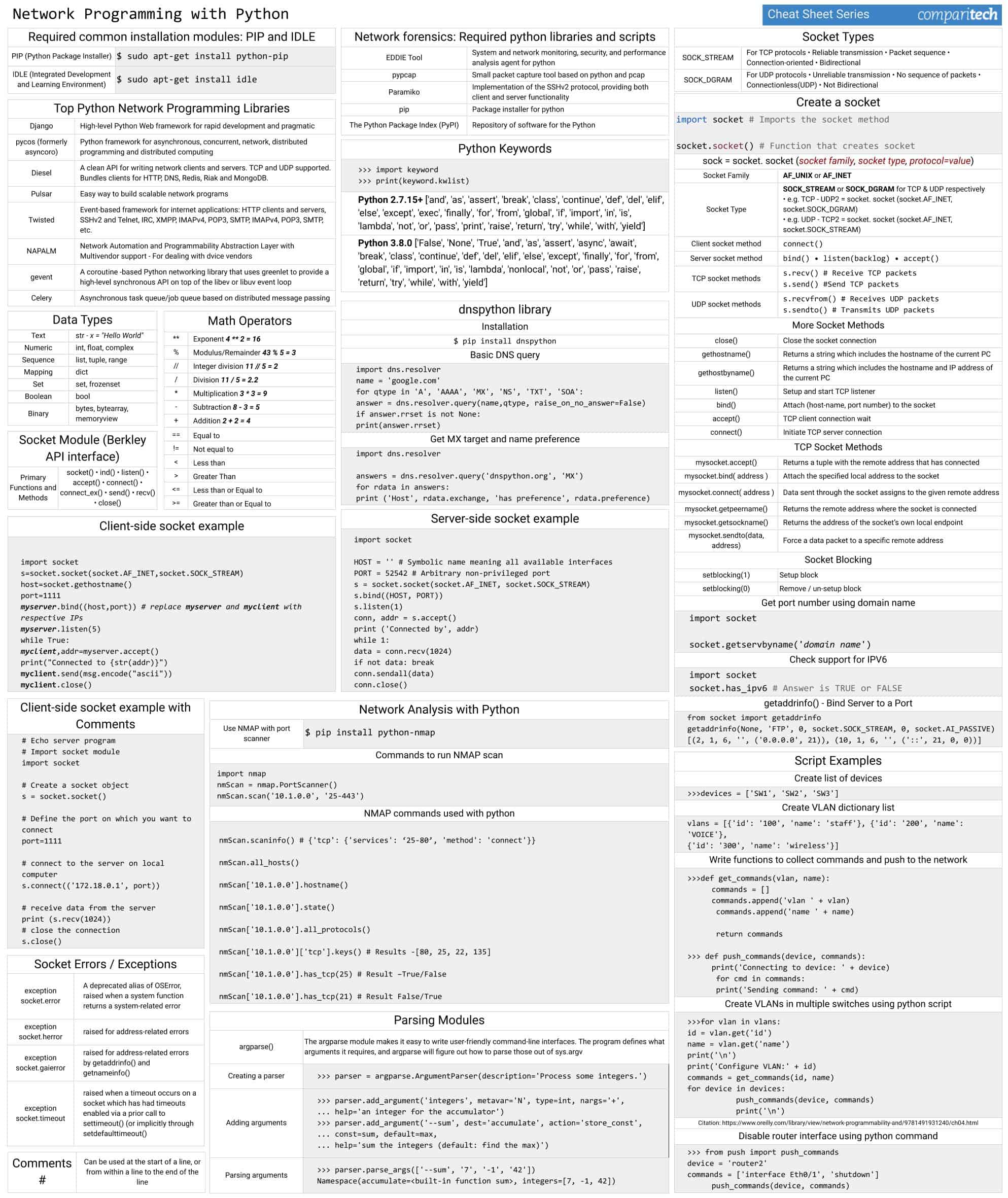
The Python Network Programming Cheat Sheet covers:
- Required common installation modules: PIP and IDLE
- Top python network programming libraries
- Network forensics: Required python libraries and scripts
- Python Keywords
- Data Types, Math operators
- Network Analysis with Python
- The dnspython library
- Socket Module (Berkley API interface)
- Socket Types, Creating Sockets
- Socket Examples
- Script Examples
- Parsing Modules
View or Download the Cheat Sheet JPG image
Right-click on the image below to save the JPG file (1987 width x 2362 height in pixels), or click here to open it in a new browser tab. Once the image opens in a new window, you may need to click on the image to zoom in and view the full-sized jpeg.
View or Download the cheat sheet PDF file
Download the cheat sheet PDF file here. When it opens in a new browser tab, simply right click on the PDF and navigate to the download menu.
Mục Lục
What’s included in this cheat sheet
The following categories and items have been included in the cheat sheet:
Required common installation modules: PIP and IDLE
PIP (Python Package Installer)
$ sudo apt-get install python-pip
IDLE (Integrated Development and Learning Environment)
$ sudo apt-get install idle
Top python network programming libraries
Django
High-level Python Web framework for rapid development and pragmatic
pycos (formerly asyncoro)
Python framework for asynchronous, concurrent, network, distributed programming and distributed computing
Diesel
A clean API for writing network clients and servers. TCP and UDP supported. Bundles clients for HTTP, DNS, Redis, Riak and MongoDB.
Pulsar
Easy way to build scalable network programs
Twisted
Event-based framework for internet applications: HTTP clients and servers, SSHv2 and Telnet, IRC, XMPP, IMAPv4, POP3, SMTP, IMAPv4, POP3, SMTP, etc.
NAPALM
Network Automation and Programmability Abstraction Layer with Multivendor support – For dealing with dvice vendors
gevent
A coroutine -based Python networking library that uses greenlet to provide a high-level synchronous API on top of the libev or libuv event loop
Celery
Asynchronous task queue/job queue based on distributed message passing
Network forensics: Required python libraries and scripts
EDDIE Tool
System and network monitoring, security, and performance analysis agent for python
pypcap
Small packet capture tool based on python and pcap
Paramiko
Implementation of the SSHv2 protocol, providing both client and server functionality
pip
Package installer for python
The Python Package Index (PyPI)
Repository of software for the Python
Python Keywords
>>> import keyword

>>> print(keyword.kwlist)
Python 2.7.15+ [‘and’, ‘as’, ‘assert’, ‘break’, ‘class’, ‘continue’, ‘def’, ‘del’, ‘elif’, ‘else’, ‘except’, ‘exec’, ‘finally’, ‘for’, ‘from’, ‘global’, ‘if’, ‘import’, ‘in’, ‘is’, ‘lambda’, ‘not’, ‘or’, ‘pass’, ‘print’, ‘raise’, ‘return’, ‘try’, ‘while’, ‘with’, ‘yield’]
Python 3.8.0 [‘False’, ‘None’, ‘True’, ‘and’, ‘as’, ‘assert’, ‘async’, ‘await’, ‘break’, ‘class’, ‘continue’, ‘def’, ‘del’, ‘elif’, ‘else’, ‘except’, ‘finally’, ‘for’, ‘from’, ‘global’, ‘if’, ‘import’, ‘in’, ‘is’, ‘lambda’, ‘nonlocal’, ‘not’, ‘or’, ‘pass’, ‘raise’, ‘return’, ‘try’, ‘while’, ‘with’, ‘yield’]
Data Types
Text
str – x = “Hello World”
Numeric
int, float, complex
Sequence
list, tuple, range
Mapping
dict
Set
set, frozenset
Boolean
bool
Binary
bytes, bytearray, memoryview
Math operators
**
Exponent 4 ** 2 = 16
%
Modulus/Remainder 43 % 5 = 3
//
Integer division 11 // 5 = 2
/
Division 11 / 5 = 2.2
*
Multiplication 3 * 3 = 9
–
Subtraction 8 – 3 = 5
+
Addition 2 + 2 = 4
==
Equal to
!=
Not equal to
<
Less than
>
Greater Than
<=
Less than or Equal to
>=
Greater than or Equal to
Comments
#
Can be used at the start of a line, or from within a line to the end of the line
Network Analysis with Python
Use NMAP with port scanner
$ pip install python-nmap
Commands to run NMAP scan
import nmap

nmScan = nmap.PortScanner()

nmScan.scan('10.1.0.0', '25-443')
NMAP commands used with python
nmScan.scaninfo() # {'tcp': {'services': ‘25-80’, 'method': 'connect'}}

nmScan.all_hosts()

nmScan['10.1.0.0'].hostname()

nmScan['10.1.0.0'].state()

nmScan['10.1.0.0'].all_protocols()

nmScan['10.1.0.0']['tcp'].keys() # Results -[80, 25, 22, 135]

nmScan['10.1.0.0'].has_tcp(25) # Result True/False

nmScan['10.1.0.0'].has_tcp(21) # Result False/True
The dnspython library
Installation
$ pip install dnspython
Basic DNS query
import dns.resolver

name = 'google.com'

for qtype in 'A', 'AAAA', 'MX', 'NS', 'TXT', 'SOA':

answer = dns.resolver.query(name,qtype, raise_on_no_answer=False)

if answer.rrset is not None:

print(answer.rrset)
Get MX target and name preference
import dns.resolver


answers = dns.resolver.query('dnspython.org', 'MX')

for rdata in answers:

print ('Host', rdata.exchange, 'has preference', rdata.preference)
Socket Module (Berkley API interface)
Primary Functions an Methods
socket() • ind() • listen() • accept() • connect() • connect_ex() • send() • recv() • close()
Socket Types
SOCK_STREAM
For TCP protocols • Reliable transmission • Packet sequence • Connection-oriented • Bidirectional
SOCK_DGRAM
For UDP protocols • Unreliable transmission • No sequence of packets • Connectionless(UDP) • Not Bidirectional
Creating Sockets
import socket # Imports the socket method
socket.socket() # Function that creates socket
sock = socket. socket (socket family, socket type, protocol=value)
Socket Family
AF_UNIX or AF_INET
Socket Type
SOCK_STREAM or SOCK_DGRAM for TCP & UDP respectively
• e.g. TCP – UDP2 = socket. socket (socket.AF_INET, socket.SOCK_DGRAM)
• e.g. UDP – TCP2 = socket. socket (socket.AF_INET, socket.SOCK_STREAM)
Client socket method
connect()
Server socket method
bind() • listen(backlog) • accept()
TCP socket methods
s.recv() # Receive TCP packets

s.send() #Send TCP packets
UDP socket methods
s.recvfrom() # Receives UDP packets

s.sendto() # Transmits UDP packets
More Socket Methods
close()
Close the socket connection
gethostname()
Returns a string which includes the hostname of the current PC
gethostbyname()
Returns a string which includes the hostname and IP address of the current PC
listen()
Setup and start TCP listener
bind()
Attach (host-name, port number) to the socket
accept()
TCP client connection wait
connect()
Initiate TCP server connection
TCP Socket Methods
mysocket.accept()
Returns a tuple with the remote address that has connected
mysocket.bind( address )
Attach the specified local address to the socket
mysocket.connect( address )
Data sent through the socket assigns to the given remote address
mysocket.getpeername()
Returns the remote address where the socket is connected
mysocket.getsockname()
Returns the address of the socket’s own local endpoint
mysocket.sendto(data, address)
Force a data packet to a specific remote address
Socket Blocking
setblocking(1)
Setup block
setblocking(0)
Remove / un-setup block
Get port number using domain name
import socket

socket.getservbyname('domain name')
Check support for IPV6
import socket

socket.has_ipv6 # Answer is TRUE or FALSE
getaddrinfo() – Bind Server to a Port
from socket import getaddrinfo

getaddrinfo(None, 'FTP', 0, socket.SOCK_STREAM, 0, socket.AI_PASSIVE)

[(2, 1, 6, '', ('0.0.0.0', 21)), (10, 1, 6, '', ('::', 21, 0, 0))]
Socket Examples
Client-side socket example
import socket

s=socket.socket(socket.AF_INET,socket.SOCK_STREAM)

host=socket.gethostname()

port=1111

myserver.bind((host,port)) # replace myserver and myclient with repsctive IPs

myserver.listen(5)

while True:

myclient,addr=myserver.accept()

print("Connected to {str(addr)}")

myclient.send(msg.encode("ascii"))

myclient.close()
Client-side Socket example with Comments
# import the socket library

import socket


# create a socket object

s = socket.socket()

print ("Socket created")


# reserve a port on the computer which can be anything

port = 1111


# bind to the port

# empty string in the IP field instead of an IP makes server listen to requests

# coming from other computers on the network

s.bind(('', port))

print ("socket binded to %s" %(port))


# make socket into listening mode

s.listen(5)

print ("socket is listening")


# loop until user interrupt it or an error occurs

while True:


# Establish connection with client.

c, addr = s.accept()

print ('Got connection from', addr)


# send a thank you message to the client.

c.send('Thank you for connection')


# Close the connection

c.close()
Script Examples
Create list of devices
>>>devices = ['SW1', 'SW2', 'SW3']
Create VLAN dictionary list
vlans = [{'id': '100', 'name': 'staff'}, {'id': '200', 'name': 'VOICE'},

{'id': '300', 'name': 'wireless'}]
Write functions to collect commands and push to the network
>>>def get_commands(vlan, name):

commands = []

commands.append('vlan ' + vlan)

commands.append('name ' + name)


return commands


>>> def push_commands(device, commands):

print('Connecting to device: ' + device)

for cmd in commands:

print('Sending command: ' + cmd)
Create VLANs in multiple switches using python script
>>>for vlan in vlans:

id = vlan.get('id')

name = vlan.get('name')

print('\n')

print('Configure VLAN:' + id)

commands = get_commands(id, name)

for device in devices:

push_commands(device, commands)

print('\n')
Citation: https://www.oreilly.com/library/view/network-programmability-and/9781491931240/ch04.html
Disable router interface using python command
>>> from push import push_commands

device = 'router2'

commands = ['interface Eth0/1', 'shutdown']

push_commands(device, commands)
Parsing Modules
argparse()
The argparse module makes it easy to write user-friendly command-line interfaces. The program defines what arguments it requires, and argparse will figure out how to parse those out of sys.argv
Creating a parser
>>> parser = argparse.ArgumentParser(description='Process some integers.')
Adding arguments
>>> parser.add_argument('integers', metavar='N', type=int, nargs='+',

... help='an integer for the accumulator')

>>> parser.add_argument('--sum', dest='accumulate', action='store_const',

... const=sum, default=max,

... help='sum the integers (default: find the max)')
Parsing arguments
>>> parser.parse_args(['--sum', '7', '-1', '42'])

Namespace(accumulate=, integers=[7, -1, 42])
Python network programming FAQs
How Python can be used in networking?
Python is a flexible programming language and it can be used to automate many business tasks. On networks, you would use Python scripts to perform maintenance tasks, collect and transform data, or to update settings. A useful application for Python on networks is to ensure coordination between different components in a system. For example, all of the elements in a software-defined network can be aligned through the use of Python scripts.
Is Python good for socket programming?
You can bind and release a socket with Python very easily. There are a number of network traffic management services that you can construct with Python, such as resequencing packets or checking for abandoned connections.
Why is Python good for network automation?
The short answer to why Python is good for network programming is that Cisco System uses it for the on-board programs on its devices, so if they put in lots of research into the relative benefits of programming languages for networking, you could just take their word for it and save yourself a lot of time. Pointing to the qualities that recommend Python for network programming is that it is extensible by libraries in the way that C is but it is much easier to read than C and it doesn’t need to be compiled.

















![Toni Kroos là ai? [ sự thật về tiểu sử đầy đủ Toni Kroos ]](https://evbn.org/wp-content/uploads/New-Project-6635-1671934592.jpg)


