
Facebook Audience Network Report Walkthrough – Facebook Audience Network
Currently Supported:
Marketing API version 14
Graph API version 15.
Mục Lục
Introduction
Audience Network allows you to monetize your apps by showing ads from Facebook advertisers, website, Instant Articles or Instant Games platform. The ads shown on your app, site or platform come from Facebook advertisers who choose to run their ads on Audience Network.
Configure your Audience Network River
First, Please make sure you’ve created a Facebook Audience Network Connection.
In order to pull your reporting data from the Facebook Audience Network, you must configure some things:
- Choose your Account from the accounts list. In order to get the entire list, Please press on the Refresh
 button near the list
 - You must choose at least one metric from the metrics list.
Those are the metrics available in Rivery: - Please choose Breakdown to your report. If no breakdown has been chosen, the report will be in general in the account level. The breakdowns are:
- Metrics Period Resolution: The period resolution that the metrics refer to.
- Daily: Means every metric will refer on the date it sums.
- Lifetime: Means that every metric will refer to the lifetime summed data that had been aggregated until the referred date.
- Time Period:

Metrics
Name
Description
Ad Network Revenue
Estimated revenue
Ad Network Requests
Number of ad requests
Ad Network CPM
Estimated CPM
Ad Network Clicks
Number of clicks
Ad Network Impressions
Number of impressions
Ad Network Filled Request
Number of filled ad requests
Ad Network Fill Rate
Rate of filled ad requests
Ad Network CTR
Estimated click rate
Ad Network Show Rate
Impressions divided by Filled
Ad Network Video Guarantee Revenue
Video guarantee revenue
Ad Network Video Views
Number of 10 seconds video views
Ad Network Video Views Rate
0 second video view rate
Ad Network Video MRC
Number of 2 second video views
Ad Network Video MRC Rate
2 second video view rate
Ad Network Bidding Requests
Number of bid requests
Ad Network Bidding Response
Number of bid responses
Breakdowns
Name
Description
Country
Breakdown by the country in which the metric took place.
Delivery Method
Breakdown by either standard or bidding when the metric comes from an ad served through AN Bidding.
Available only for Publishers using Monetization Manager
Platform
Breakdown by the platform from which the metric was logged.
Available only for Publishers using Monetization Manager
App
Breakdown by App ID.
Property
Breakdown by Property ID.
Placement
Breakdown by placement ID.
Deal
Breakdown by deal ID.
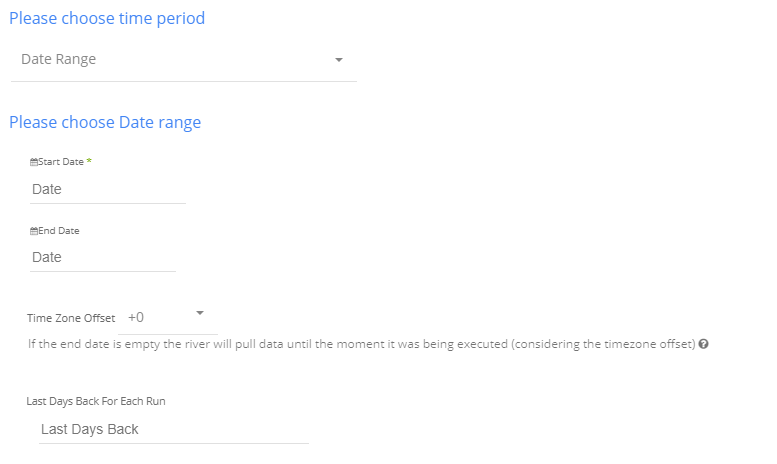
Select the type of time period of the report.
It can be a custom date range (as described in the picture above) or a defined time period shown in the pop up list (for example Yesterday, last week etc.)
Instructions if selecting ‘Date Range’:
Select the start date and end date.
Leave the end date empty in order to pull data until the moment
the river runs.
After each run of the river, the start date will be updated automatically with the end date, and the end date will be updated with the empty value. This enables the next run to pull data from the end of the previous run.
Select the time zone offset. It will be relevant only if the end date is empty in order to find the moment of the river’s run according to the time zone.
Days back – use this input to tell Rivery to pull data from the given days back before the given start date.
Instructions if selecting any other value:
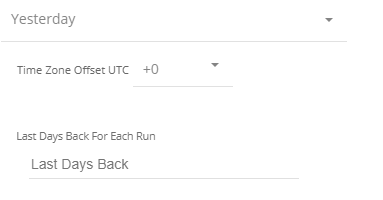
Select the timezone offset in order to send the correct dates that consider that offset.













![Toni Kroos là ai? [ sự thật về tiểu sử đầy đủ Toni Kroos ]](https://evbn.org/wp-content/uploads/New-Project-6635-1671934592.jpg)


